How small a defect, and how big a product, can one iPhone actually inspect?

Quick summary
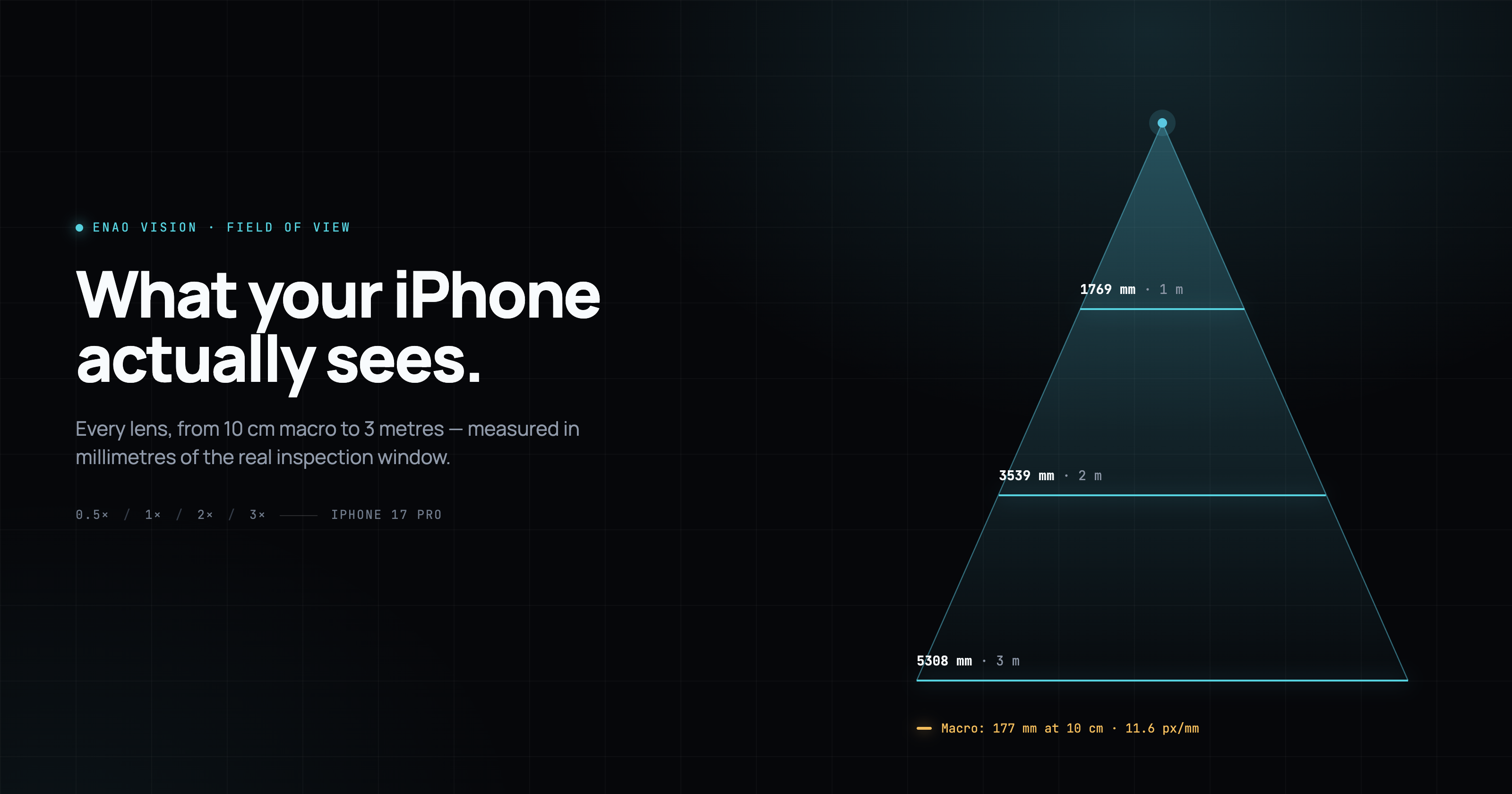
An iPhone 17 Pro mounted on your line covers a range that stretches from 260-micron defects (a fine surface scratch on plated metal) out to 5.3-metre-wide pallets. Which extreme you reach depends only on which lens you pick and how far the mount sits from the target. One device gives you four configurations, which is what would take three separate Keyence or Cognex sensors to cover.
Smallest reliably detected defect, per configuration:
- Macro (Ultra Wide at 10 cm, iPhone Pro only): ~0.26 mm
- Telephoto (3×) at 1 m: ~0.5 mm
- Main 2× at 1 m: ~0.8 mm
- Main 1× at 1 m: ~1.6 mm
- Ultra Wide at 1 m: ~3 mm
Largest square area covered, per configuration:
- Ultra Wide at 3 m: 5.3 × 5.3 m
- Main 1× at 3 m: 3.3 × 3.3 m
- Main 2× at 3 m: 1.6 × 1.6 m
- Telephoto at 3 m: 1.0 × 1.0 m
Start with field of view
Mount an iPhone on a bracket above your line and the first thing you want to know is: how much of the line does it actually see? Field of view sets what you can inspect, what you can count, and how many devices it takes to cover a station. Get it wrong and either the camera misses half the part, or you end up with three iPhones on a job that needed one.
Below is what you need to work that out for yourself, before you screw in a mount: what field of view means when the iPhone is doing the job of an industrial camera, why every setup goes through a 1:1 square crop, how the four available lenses behave at real working distances, and how to pick the right one for whatever you are trying to inspect.
Why we crop to 1:1
The iPhone sensor is 4:3. Almost every industrial inspection task is not. Parts pass through a station one at a time, defect regions of interest sit inside a square evaluation zone, and machine learning models train more reliably on consistent square inputs. Rather than force the model to reason about aspect ratio changes between lenses, Enao takes a square crop from the middle of a 2K sensor readout. The side pixels are discarded, and the width and height of the visible plane collapse into the same number.
The payoff is that every lens produces the same-shape frame, so switching from the main to the telephoto between shifts never breaks a defect model or an alert coordinate. The cost is a slice of the side pixels, which on a 48 MP main sensor cropped to 2K square is small enough not to matter for inspection.
The four iPhone lenses, in plain terms
iPhone 17 Pro ships with three physical rear cameras and one high-quality digital option that behaves like a fourth. Enao exposes all four to you because each one owns a different working distance and defect size.
Ultra Wide at 0.5× zoom, 13 mm equivalent focal length. This is the panoramic option, whose job is to show as much of a line, a room, or a pallet as possible in a single frame. On very short working distances it captures the whole area around a workstation without needing a wide-angle industrial lens. The Ultra Wide is also the only lens with an autofocus range short enough for macro mode, which activates automatically on iPhone Pro models when the mount sits around 10 cm from the target. In macro mode the same lens becomes a near-microscopic inspection tool, resolving features under 0.3 mm from a working distance you could span with your hand. The trade-off at longer distances is resolution per millimetre, since a defect that measures 3 mm across covers only a few pixels at 3 m range.
Main / Fusion at 1× zoom, 24 mm equivalent. The default lens, and roughly the same field of view you perceive when you look straight ahead at arm's length. Most setups land here because it balances coverage and detail well enough for output counting, product recognition, barcode reading and mid-range defect detection on one mount.
Main / Fusion at 2× zoom, 48 mm equivalent, lossless sensor crop. Apple's 48 MP sensor is large enough that Enao can crop the middle to simulate a lens twice as long without losing pixel resolution. The result is a field of view exactly half the size of the 1× main, at the same 2K working resolution. Useful when you want more detail on a defect but do not want to physically move the camera closer or add a real telephoto lens.
Telephoto at 3× zoom, 77 mm equivalent. A dedicated optical lens designed for reach, with narrow and tightly constrained coverage. This is what you use when the defect is small and you cannot move the mount closer, or when the object you want to inspect is on a fast line and you need to keep the mount out of the way of operators and forklifts.
The exact numbers, from 10 cm macro out to 3 m
The diagram below is the one to bookmark or print out before you spec a mount. Each column shows one lens. Each horizontal plane shows the size of the square field of view at that working distance, measured from the lens to the inspection plane. Because light projection is linear, the 2 m plane is exactly twice the size of the 1 m plane, and the 3 m plane is three times the size. The 10 cm row is separate: it shows the Ultra Wide in macro mode, where the same linear relationship holds but only one lens can focus that close.
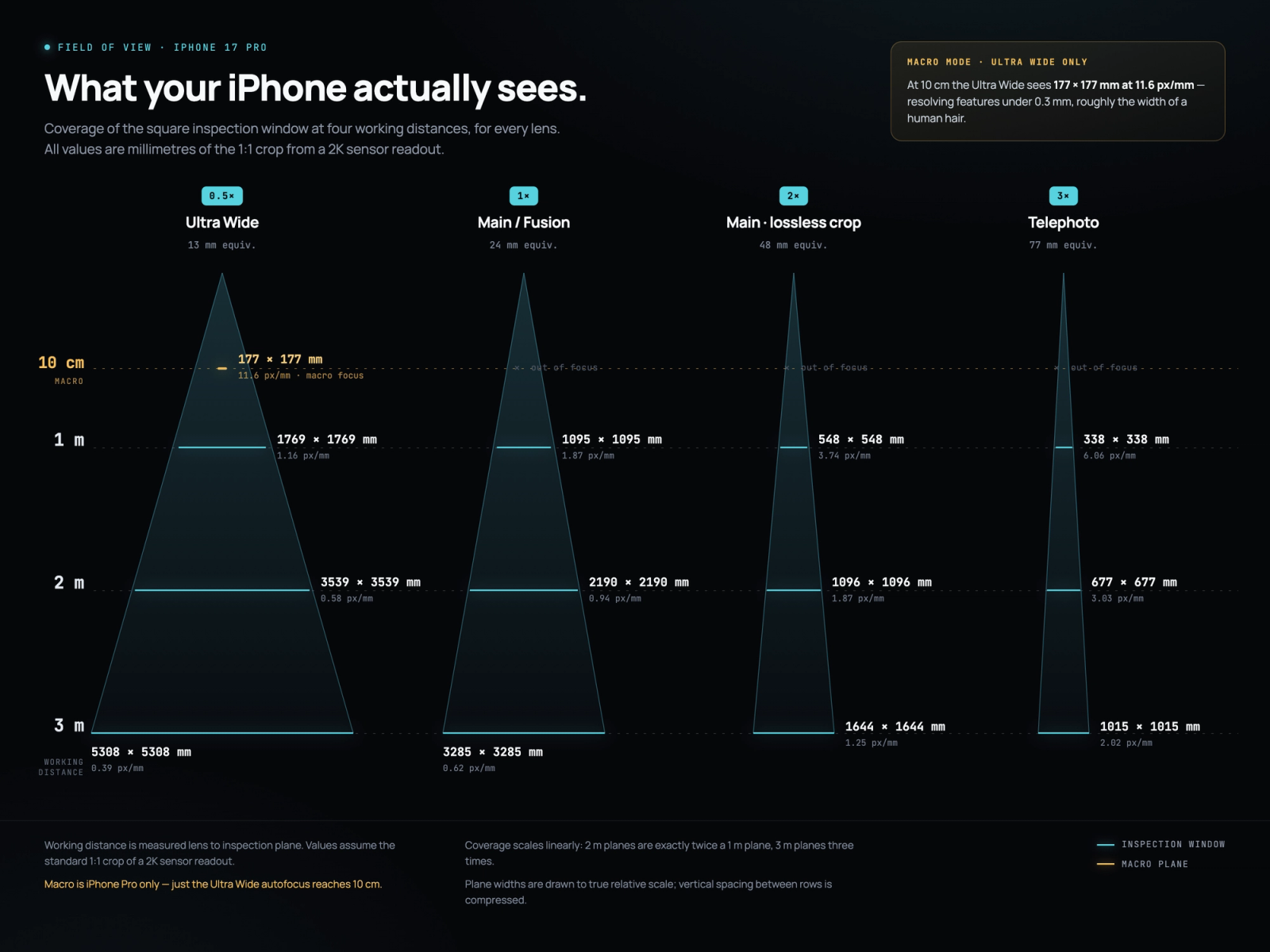
The mobile-optimised version of the same diagram uses a compact card layout, one card per lens, with proportional bars sized to real 1 m, 2 m and 3 m coverage.
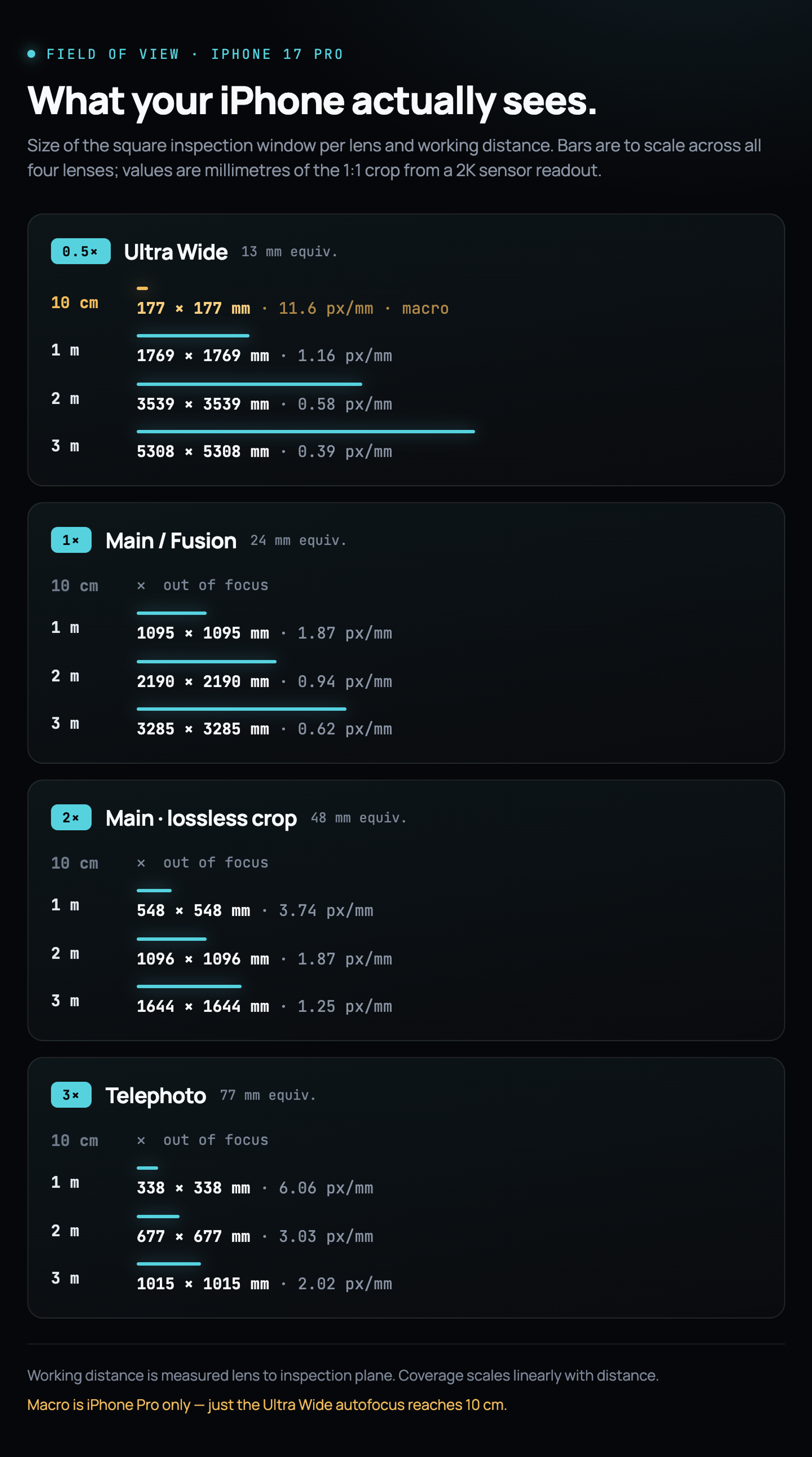
The same values in table form.
| Working distance | Ultra Wide (0.5× / 13 mm) | Main 1× (24 mm) | Main 2× (48 mm) | Telephoto (3× / 77 mm) |
|---|---|---|---|---|
| 10 cm (macro, iPhone Pro) | 177 × 177 mm | out of focus | out of focus | out of focus |
| 1 m | 1769 × 1769 mm | 1095 × 1095 mm | 548 × 548 mm | 338 × 338 mm |
| 2 m | 3539 × 3539 mm | 2190 × 2190 mm | 1096 × 1096 mm | 677 × 677 mm |
| 3 m | 5308 × 5308 mm | 3285 × 3285 mm | 1644 × 1644 mm | 1015 × 1015 mm |
A quick sanity check that engineers appreciate: the 2× main is exactly half the size of the 1× main at every distance. That is a direct consequence of the sensor crop math. Doubling the effective focal length halves the covered width and height. The 10 cm macro row extends the same relationship in the other direction; the Ultra Wide at 10 cm covers exactly one tenth of what it covers at 1 m.
Pixel per millimetre, the number that decides what you can actually inspect
Coverage tells you what is inside the frame. Resolution per millimetre tells you whether the AI can see the defect that matters. The 1:1 crop uses a 2K readout, so every square field of view above is captured at 2048 by 2048 pixels. Divide the pixel count by the field of view width and you get the pixel per millimetre density at that distance. Multiply the inverse by three or four pixels and you get a working estimate of the smallest defect a defect-detection model can reliably classify.
| Working distance | Ultra Wide (0.5×) | Main 1× | Main 2× | Telephoto (3×) |
|---|---|---|---|---|
| 10 cm (macro) | 11.57 px/mm · ~0.26 mm min defect | out of focus | out of focus | out of focus |
| 1 m | 1.16 px/mm · ~3 mm | 1.87 px/mm · ~1.6 mm | 3.74 px/mm · ~0.8 mm | 6.06 px/mm · ~0.5 mm |
| 2 m | 0.58 px/mm · ~5 mm | 0.94 px/mm · ~3.2 mm | 1.87 px/mm · ~1.6 mm | 3.03 px/mm · ~1.0 mm |
| 3 m | 0.39 px/mm · ~7.7 mm | 0.62 px/mm · ~4.8 mm | 1.25 px/mm · ~2.4 mm | 2.02 px/mm · ~1.5 mm |
The rule of thumb behind the min defect column: a defect needs to cover three to four pixels in the frame before a modern AI model can classify it with the reliability a production line requires. Sub-pixel defects can sometimes be flagged with anomaly detection, but for named defect classes with acceptable false positive rates, three to four pixels is the working floor.
The 10 cm macro row is the ceiling of what an iPhone can resolve today. At 11.57 pixels per millimetre, the smallest defect the AI will reliably classify is roughly 260 microns, which is a little more than twice the width of a human hair. That covers fine surface scratches on plated metal, print quality issues on labels, solder-joint anomalies on small PCBs, tolerance checks on plastic overmoulds, and laser-mark verification on machined parts. Features that used to require a bench microscope or a dedicated macro-optics inspection cell you can now inspect by walking up to a mounted iPhone.
How to pick the right lens for a specific line
The lens question always resolves into two others: how far is the mount from the part, and how small is the smallest thing that has to be seen.
If the mount is on a ceiling beam 3 m above a bulk conveyor and the target is output counting on hand-sized products, the Ultra Wide covers the whole width of the belt with room to spare. If the mount is on a bracket 1 m above a stamping station and the target is scratch detection on a metal cover, the Main 2× or the Telephoto is the right call because a 1 mm scratch simply does not exist on the Ultra Wide at that distance.
Most setups start on the main lens at 1×, because it maps cleanly to the space you would stand and look at the line. The 2× crop is the first upgrade when a defect model starts missing small features. The Ultra Wide is the answer for pallet-scale inspection and multi-station coverage from a single mount. The Telephoto is the answer for reach: it lets one iPhone sit in a safe corner and still watch a specific machine or product feature across a long span. Macro mode on the Ultra Wide handles the opposite extreme, near-microscopic inspection at 10 cm on iPhone Pro hardware, where the mount is really a small fixture on the workstation itself.
Two practical rules from setups that went wrong more than once. Do not use the Ultra Wide when the target defect is under 5 mm and the working distance is over 2 m. The numbers above show why: if the pixels per millimetre are below the resolution the model needs, no amount of lighting or training will recover the missing information. And do not plan a macro setup on a base-model iPhone. The autofocus range on the Ultra Wide is only short enough for 10 cm work on the Pro line, and you will spend an evening trying to figure out why the frame stays out of focus before realising the hardware just cannot do it.
How this compares to fixed-lens industrial vision sensors
The interesting part of the iPhone approach is not the field of view math on its own, but what happens when you compare it to how the industry has traditionally solved the same problem. Vision sensor lineups from vendors like Keyence and Cognex are organised as separate part numbers per field of view.
Keyence's current IV4 series, the successor to the widely deployed IV3 line, ships as a family of distinct models. The IV4-600 sensors cover the wide field of view range, in monochrome (IV4-600MA) or colour (IV4-600CA). Narrower fields of view live on separate model numbers. If you need to inspect an even smaller feature, there is a magnifying lens attachment sold as an accessory. Each configuration is a different SKU to specify, quote and stock. The IV4's IP67 rating and built-in AI make it a competent product, and the constraint is that you commit to one focal length per unit at purchase.
Cognex sits in a similar place. The In-Sight 9000 line ships in variants for narrow and wide fields of view, and the C-mount In-Sight and DataMan systems require you to select a compatible lens by focal length at install time. Switching from a wide inspection to a close-up defect check means physically swapping the sensor, the lens or the whole unit. That is not a criticism of Cognex hardware, which is excellent; it is a description of how fixed-lens machine vision is priced and sold.
Put next to that pattern, one iPhone is effectively three or four vision sensors in one enclosure. The Ultra Wide, main 1×, main 2× and telephoto lenses cover the same field of view range that a Keyence IV4 installation would need three separate SKUs to hit. Enao switches between them in software, and the switch happens between shifts if a line reconfigures. The hardware bill of materials collapses accordingly: a refurbished iPhone with a lamp and a mount sits under €1,000, against three industrial vision sensors that each carry list prices in the low thousands of euros before controllers, cables and IP-rated enclosures are added on.
The trade-off is honest. A Keyence IV4 is IP67 rated, purpose-built for a single station, and optically fixed at its specified focal length. It will not switch to a wider view if you rearrange the line next quarter. That is a feature in a plant with a locked production process, and a good reason to buy dedicated hardware where quality control is life-critical. In most other settings the iPhone's flexibility, one device covering four fields of view reconfigurable in the app, is worth more than optics purpose-built for one exact geometry.
The iPhone as an industrial sensor
Everything in this post is really about one framing. The iPhone is not a smartphone stapled to a production line. It is a general-purpose visual intelligence node with four lenses, a Neural Engine that runs models at line speed, a USB-C port that talks Ethernet and 24 V signals, and a factory-resilient chassis. Picking the lens is the same act you perform when you open a Keyence, Cognex or Basler catalogue and choose a fixed focal length. The difference is that all four lenses live on one device, you reconfigure them in the app between shifts, and the hardware costs under €1,000 for a refurbished iPhone, a lamp and a mount.
That is why working out the field of view math is worth twenty minutes of your time at the start of a project. It is the same math you would run for a fixed camera cell, done once, then reused across every station where an iPhone eventually mounts.
FAQ
How small a defect can an iPhone reliably detect? 0.26 mm at 10 cm working distance in macro mode. The rule of thumb is that any defect covering at least three pixels in the frame gets classified reliably. At maximum resolution (Ultra Wide macro on iPhone Pro), the 2K sensor readout gives 11.57 pixels per millimetre, so three pixels equals 0.26 mm, roughly twice the width of a human hair.
How big an area can one iPhone cover? 5.3 × 5.3 metres square, using the Ultra Wide lens at a 3-metre working distance. Enough for a full pallet or the width of a bulk conveyor from a ceiling-mounted bracket.
Do I need an iPhone Pro, or does a standard iPhone work? Standard iPhones cover the 1 m to 3 m range on all four lens options. Macro mode at 10 cm only works on Pro models, because the Ultra Wide autofocus range on standard iPhones does not reach that close. If your inspection needs sub-millimetre defect detection, spec a Pro.
Which lens should I start with? The Main lens at 1× is the default for most setups. It balances coverage and detail well enough for output counting, product recognition, barcode reading and mid-range defect detection. Upgrade to 2× lossless crop when a defect model starts missing small features, or switch to the Telephoto (3×) when you need long reach from a safe mounting corner.
How is this different from a Keyence IV4 or Cognex In-Sight? Fixed-lens vision sensors ship as one part number per field of view. Covering the range from wide inspection to close-up defect detection means buying three separate sensors. One iPhone gives you the same range from a single device, switchable in software between shifts. The honest trade-off is that a Keyence IV4 is IP67-rated and optically fixed for one station, which is what you want if the line never changes.
Where do the numbers come from? Enao runs every deployment through a 1:1 square crop of a 2K sensor readout (2048 × 2048 pixels). Field of view expands linearly with working distance, so the 2 m plane is exactly twice the 1 m plane, and the 3 m plane is three times. Pixel-per-millimetre resolution is 2048 divided by the field of view width in millimetres. Multiply the inverse by three pixels and you get the smallest defect the AI can classify reliably.
Related reading
- Industrial image processing, a working guide for factory teams
- Machine vision inspection, what it is, what it costs and when to use it
- AI visual inspection vendors compared: Keyence, Cognex, Basler and iPhone-based systems
- Machine vision systems in 2026: types and how to pick
Get started
The fastest way to see whether the FOV math above works for your inspection is to run it. Try the demo to watch an iPhone inspect a live video feed in your browser (no signup, no email, sixty seconds), or get started for free with the Basic tier and mount an iPhone on your own line today.
Explore with AI
Discuss this article with your favorite AI assistant
