iPhone for industrial quality control: which model and how to deploy

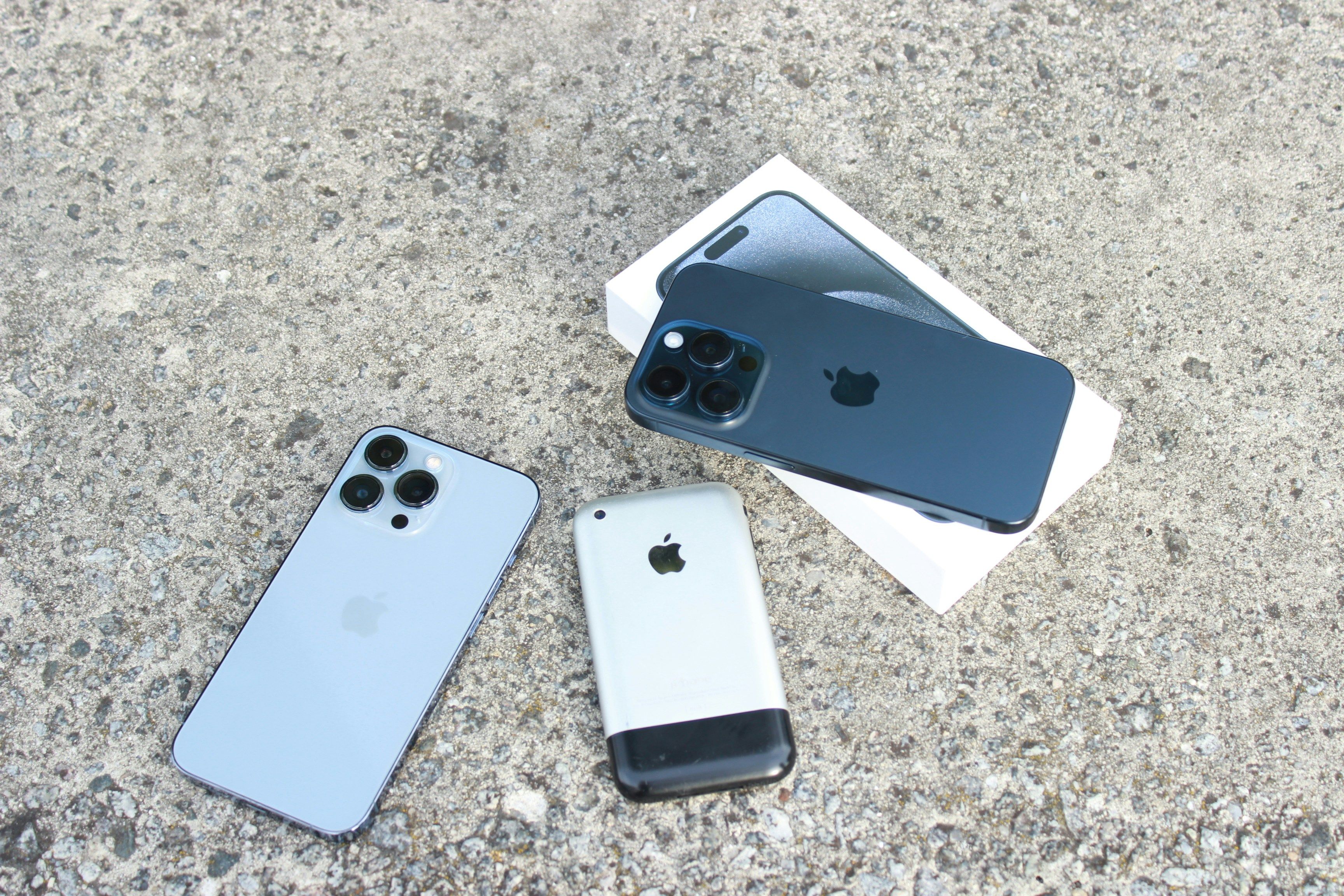
We get this question a lot. Here's the short answer: any iPhone works, but for long term installations we recommend iPhone 12 or newer. If you need USB-C or plan to use the Enao Vision Bridge, go with iPhone 15+.
Why iPhone 12 is our baseline
Enao runs multiple AI models directly on your iPhone, no cloud, everything local. That takes real compute power, and the chip inside your iPhone determines how well it handles it.
Apple introduced a new chip architecture with the iPhone 11, moving AI inference from CPU-only to GPU-accelerated. Big difference in speed. But the iPhone 11 was the first generation, we ran into quirks and bugs that we've since worked around. It runs stable now, but it's not our recommended starting point.
iPhone 12 is where things get solid. Second-generation chip. Reliable. Fast enough for high-speed production lines.
Can you use older iPhones? Yes. Will they work? Yes. But on fast lines with high inspection frequency, older models get warm and may struggle to keep up. For testing or slow lines, they're fine. For long term installations, start with iPhone 12.
Battery life: not a factor
Apple has improved battery life over the years, but even on older models we haven't seen battery issues in production. The iPhones are plugged in and charging in most setups anyway. Don't let battery influence your buying decision. There is a fun video of HDX Studio on YouTube on iPhone battery life. Check it out.
Why not an iPad?
iPads work with Enao. But we'd stick with iPhones. The device is mounted on the line, you're not looking at the screen. A bigger display just uses more battery and takes up more space for no real benefit.
iPhone 15 and USB-C: why it matters
Starting with iPhone 15, Apple switched from Lightning to USB-C. That opens up two things that matter on the shop floor:
Ethernet for unstable Wi-Fi. Some production halls have terrible Wi-Fi. With USB-C, you can plug in a LAN adapter that also charges the iPhone at the same time, rock-solid connection, no dropouts. We recommend the Belkin 100W USB-C / Ethernet and Charger Adapter.
Enao Vision Bridge. We're developing the Bridge to send 24V signals directly to your PLC. It connects via USB-C. If you plan to use signal output, you need an iPhone 15 or newer.
Standard vs. Pro: when the third camera matters
For most use cases, the standard iPhone camera is more than enough. Our AI models use relatively low-resolution images, and Apple's cameras have been excellent for years.
The Pro gives you one thing that can make a real difference: a third camera with wide-angle and macro mode.
Wide-angle is useful if your products are large and defects are also large. Instead of mounting multiple iPhones to cover the full surface, one Pro in wide-angle mode might do the job. Saves you devices and licenses.
Macro is useful for very small defects - think PCBs or fine surface textures. The Pro lets you get extremely close, down to microscopic detail.
Rule of thumb: Start with a standard iPhone. Get the Pro only if you need wide-angle for large products or macro for tiny defects.
Quick reference
Basic testing, slow lines: Any iPhone (even older models)
Production use, stable performance: iPhone 12+
USB-C adapters, LAN connection: iPhone 15+
Enao Vision Bridge (24V signal output): iPhone 15+
Wide-angle or macro inspection: Any Pro model
How iPhone compares to industrial cameras on the shopfloor
The two paths for putting a camera on a production line are an industrial camera (Cognex, Keyence, Basler) with a controller, or an iPhone running Enao Vision. The industrial camera path costs 15,000 to 40,000 euros per station including light, mount, integrator time, and software. The iPhone path costs under 1,000 euros: a refurbished iPhone 12, a lamp, a mount, and a cable. Both paths use the same underlying computer vision techniques and both produce pass or fail decisions with an image attached, but the setup time and the total cost of ownership over three years land in very different places.
The iPhone sensor is competitive on most inspection tasks that manufacturers actually run. Apple has optimised the camera stack for low light, motion, and focus far beyond what most industrial camera lines get in a year. For high-speed lines running 500 units per minute or for micron-level semiconductor work, an industrial camera still wins. For everything in between, which is most of manufacturing, the iPhone is enough hardware.
What visual inspection tasks the iPhone handles well
Surface defect detection is the most common use. Scratches, dents, colour drift, print defects, weld seam checks, and paint chips all fall into this bucket and the iPhone reads them cleanly at line speeds up to 100 units per minute. Presence and absence checks are the second most common: is the label there, is the seal complete, is the correct part in the correct position. Assembly verification, orientation checks, and correct-part-selection also sit here.
OCR and barcode reading round out the practical set. The iPhone reads printed batch codes, expiration dates, serial numbers, and 2D matrix codes on packaging lines with the same models Enao uses for defect classification. Industries where we have seen this land well include plastics, PCB assembly, food and beverage packaging, cosmetics, injection moulding, and ceramic tiles. The pattern is the same across all of them: an iPhone at the station, a lamp overhead, and an Enao workflow that pushes pass or fail into whatever MES or ERP the plant already runs.
Setup basics: lighting, mounting, and environment
Lighting is the single biggest predictor of whether an inspection setup will hold up. Consistent light is more important than bright light. A single LED bar mounted at a fixed angle, powered from the same circuit as the iPhone, will outperform a fancier three-light rig that is easier to knock out of alignment. Aim for the same colour temperature at every inspection station on the plant, because AI models trained on 4000K light do not read as well under 2700K light without retraining.
Mounting has to survive vibration, cleaning cycles, and the occasional bump. A rigid clamp mount with a shock-absorbing pad works better than a magnetic mount for anything that runs three shifts. Position the iPhone perpendicular to the surface you are inspecting, at a distance where the defect you care about fills at least ten pixels in the image. If the defect is smaller than ten pixels, move the camera closer or switch to a Pro model with macro.
Environment matters at the edges. Ambient dust, humidity, and temperature swings all degrade image quality over time. In a clean packaging line the iPhone runs for years with no maintenance. In a foundry with airborne particulates the lens needs a weekly wipe and the mount has to keep the phone off the hot side of the room. Enao Vision watches the exposure histogram on the phone and flags drift before it starts costing you inspections.
MES and PLC integration through the Enao Vision Bridge
The iPhone sends inspection results to the MES, ERP, or QMS the same way any industrial camera does. Enao Vision pushes pass or fail counts, defect images, timestamps, and station IDs to any endpoint that accepts an HTTP webhook. For plants running an OEE dashboard or an SPC chart, the data lands in the same feed the traditional inspection systems already write to.
For plants that need a 24-volt PLC signal on the physical line, the Enao Vision Bridge closes that gap. Bridge plugs into an iPhone 15 or newer via USB-C and provides two isolated digital outputs. That lets the iPhone drive a reject arm, an air blast, or a stack light directly, no separate controller required. Bridge is the piece that turns the iPhone from a smart camera into a full participant in the automation stack.
Where iPhone-based inspection reaches its limits
Being honest about limits builds trust. The iPhone is not the right camera for high-speed inspection lines running above 500 units per minute, for micron-level semiconductor inspection, or for environments hotter than 50 degrees Celsius. It is also not the right camera when the required exposure time is under one millisecond, because the iPhone shutter caps out before that. For those cases a Basler, Cognex, or Keyence camera is still the right choice and you will not save money forcing the iPhone onto the wrong problem.
We tell customers to start with an iPhone pilot on a slow-to-medium line, prove the accuracy on their real defects, then decide whether to scale with iPhones across the plant or to keep an industrial camera at the one station where the physics demand it. Most plants end up with a mix, and that is fine.
A one-week deployment plan
Day one: order a refurbished iPhone 12 or newer, an LED lamp, a rigid mount, and a USB-C cable. Total spend under 1,000 euros.
Day two: download the Enao Vision app on the iPhone, plug it in at the station, set up a first workflow with a handful of good and bad examples from the last production run.
Day three: run the AI in shadow mode alongside your existing inspection process. Compare the AI's calls against the operator's calls, note any disagreements, and correct the model where it was wrong.
Day four: turn the AI's calls into the primary inspection decision, keep the operator in the loop as a second opinion. Watch defect trends on the Enao dashboard and cross-check against your MES data.
Day five: connect the Bridge if you need a 24-volt signal to your PLC, or the webhook integration if you only need the pass or fail data flowing to the MES.
Day six and seven: hand the setup to the operator, document the workflow, and start a second pilot on a neighbouring line while the first one bakes. This is how a single iPhone pilot turns into a plant-wide rollout in a few weeks rather than the six to twelve month project cycle a Cognex or Keyence deployment normally runs on.
Not sure? Just start.
Download the app on whatever iPhone you have. Run a few inspections. You’ll know fast enough whether you need to upgrade, and most people don’t.
Get started
Want to see how Enao Vision works on your line? You can get started for free using an iPhone you already have, or try the demo to compare notes with other quality and operations teams putting AI on the shopfloor.
Explore with AI
Discuss this article with your favorite AI assistant
