Your MCP is your new homepage. We just launched ours.

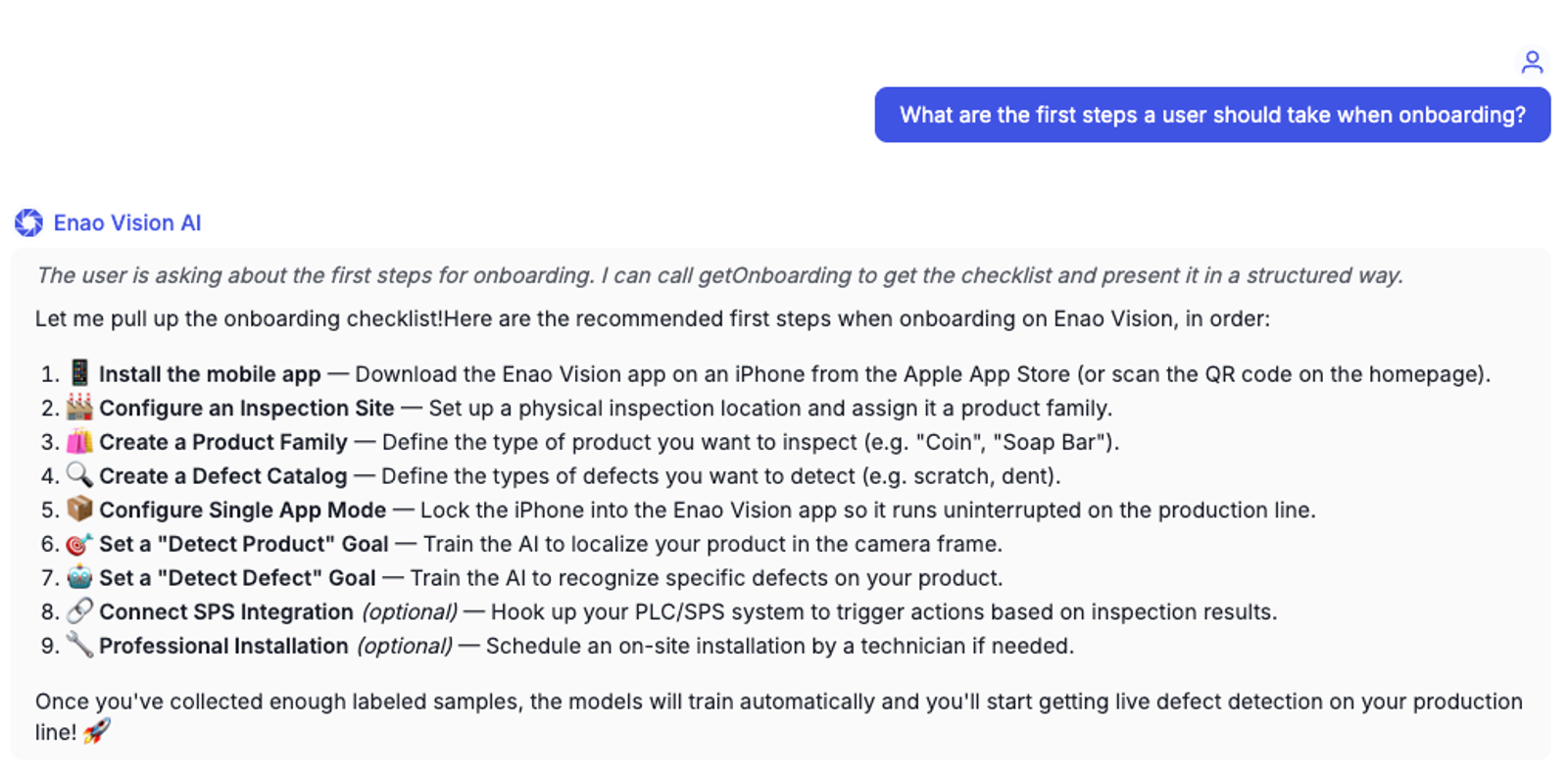
We taught our product to be controllable by AI in two weeks. A new user setting up their first line can now configure inspection cells, register cameras, set tolerances, and onboard an operator without ever opening our app. They point their agent at our MCP and the work happens in chat.
This isn't a side feature. It's the start of a wholesale shift in how software gets used, and we'd argue that within eighteen months, your traditional UI will be the exception path rather than the default.
Here is what we did, why it took two weeks instead of two months, and where it surprised us.
Why nav menus are a dying genre
For thirty years the rough shape of every B2B SaaS product has been: a sidebar, a top bar, a workspace, and a settings cog. Onboarding for a new user means reading docs, clicking around, watching a video, and slowly building a mental model of where things live. The product is a place you visit and learn to navigate.
That assumption is breaking right now. The reason is simple: when an agent can read your docs and call your APIs, the user no longer needs the navigation. They just say what they want and the agent figures out where in your product that lives. Nav becomes plumbing the user never sees, like packet routing in TCP.
We saw this most clearly with our own onboarding. New customers used to land on a dashboard, get overwhelmed, and ping us in Slack to ask the same five questions. Setting up an inspection meant connecting a camera, picking a part, defining a region of interest, training a model, and setting tolerances, with at least four different screens involved. The product worked, and people stuck with it, but the first hour was an effort wall.
Our customer success team carried that wall on their backs. So we asked a different question: what if a new user never had to find a screen in the first place?
What MCP actually is, in one paragraph
Model Context Protocol is an open standard from Anthropic that lets any agent talk to any application through a uniform contract. You expose a set of tools, each one a typed function with a clear description and a clear schema, and the agent figures out which tool to call when. Think of it as the API contract designed for an LLM consumer instead of a human developer. The agent reads your tool descriptions the way a junior engineer would read your docs, and the tool descriptions become the new product surface.
The reason this matters: every agent, in every chat client, instantly knows how to use your product. You don't need a Zapier integration, a custom GPT, a partner program, or a per-vendor SDK. You ship the MCP and you're connected to the entire agent ecosystem at once.
Salesforce just productized the same idea
Salesforce announced its Headless 360 platform on April 17, exposing the entire stack through APIs and MCP. Marc Benioff summarised the thesis in five words: "The API is the UI." Jason Lemkin's reaction at SaaStr was that this isn't a product launch but a description of how his company has been running for six months. SaaStr operates on top of Salesforce headless today, with three humans, around twenty production agents, and two AI executive-level agents (an AI VP of Marketing and an AI VP of Customer Success) that read and write the CRM continuously, while nobody on the team opens the Salesforce UI on a typical day. SaaStr now spends roughly fifteen times more on agents than on Salesforce licenses, which is the more useful number, because it tells you where value is moving in the stack.
That's the same shape as the shift we're describing, just one floor up. Salesforce-as-data-layer for SaaStr is what Enao-Vision-as-data-layer is becoming for our customers. The system of record stays where it is, the agents read and write through the protocol, and the humans see the answers in whichever chat client they prefer. The traditional UI is a path users can take when they want to, not the path they have to take.
How we shipped ours in two weeks
We didn't restructure the product. We didn't add a "new MCP team." One engineer, two weeks, sitting on top of the existing codebase.
Roughly how the days fell:
Day 1: define the tools. We sat with the customer success team and listed the operations a new user actually performs in their first hour: register a device, create an inspection, define a region, upload reference images, label good and bad samples, kick off training, set tolerances, and view results. That gave us roughly fifteen tools. We wrote each one as a typed signature with a one-line description, and treated those descriptions like product copy rather than dev comments. Bad descriptions are bad UX in the agent era.
Days 2 to 7: build the /mcp layer. We added a thin adapter on top of our existing domain services, mapping each MCP tool to one or more internal calls. The adapter is the only thing the agent ever sees. It does authentication, parameter validation, error normalisation, and rate limiting, and then forwards. We deliberately did not let the agent reach into the domain layer directly, because we wanted a clean blast radius if a tool description changed.
Days 8 and 9: frontend. We added a single panel in the app showing the MCP connection status, the available tools, and a copy-paste config block for Claude Desktop, Cursor, ChatGPT Desktop, and a generic stdio client. Nothing fancy, but it removed the last bit of "where do I plug this in" friction.
Days 10 to 12: polish and edge cases. Long uploads, partial failures, idempotency on retried tool calls, descriptive error strings for the agent to act on, and a proper rate limit story. We also added structured progress messages so the agent could narrate to the user during slow operations like a training run.
That was it. No new infrastructure, no new database, no new auth model, and roughly four hundred lines of glue plus the tool descriptions and a tests file.
The thing that surprised us
We thought the hard part would be the protocol or the agent integration. It wasn't. The hard part was schema drift.
Our domain logic has grown over two years. It has the kind of subtle inconsistencies that every real codebase accumulates: a "device" object that means slightly different things in two contexts, an "inspection" with five fields that almost overlap, a settings object whose structure is two-thirds historical accident.
A human user navigates around this drift without noticing, because they only see one screen at a time and the UI smooths the seams. An agent sees all of it at once, in the tool descriptions, and gets confused. We had to do a small, sober pass through our domain types to make them consistent enough to describe cleanly.
That pass turned out to be valuable for reasons beyond the MCP. It surfaced two real bugs in the existing UI, simplified one onboarding flow we'd been meaning to clean up for months, and made our internal API docs about thirty percent shorter. Building an MCP is a forcing function for cleaning up your domain model, in the same way that adding a public API used to be.
If you start one and your codebase fights you, that's the signal that the MCP isn't the actual problem; the drift underneath it is.
What it changes for the business
Three numbers we care about, three weeks in:
Time to first inspection running dropped from a typical two-hour first session to under twenty minutes for users with an agent. They describe the line, the part, and the defect they care about, the agent calls the right tools, we do the heavy lifting in the backend, and they end the conversation with a configured inspection.
Support tickets on first-week setup are down meaningfully. Not zero, but the easy ones (where do I find this, how do I do that) are now answered by the agent reading our tool descriptions. Customer success is back to spending their time on the hard problems, which is where they want to be.
Sales motion changed without us redesigning it. A technical evaluator at a prospect no longer wants a demo, they want to plug us into Claude or Cursor and run a real workflow themselves for an hour. We send the MCP config, they say yes or no by Friday. The buying loop compressed from two weeks to about three days on that persona.
None of these are massive standalone numbers. Together they mean we hire less customer success per dollar of revenue, we close faster, and we get to spend more of the team on product.
Who probably shouldn't ship an MCP yet
Three honest exceptions, because the post would be dishonest without them.
If you don't have any kind of API or service layer underneath your UI, an MCP isn't your next move. Build the API first, ideally as a thin internal one, and then layer the MCP on top. We could do this in two weeks because our product was already API-first under the hood, even if most users only saw the UI.
If your product is a regulated workflow where every action has to be human-attested (think aerospace quality records, GxP pharmaceutical processes, or financial transactions above a threshold), the agent path doesn't help you, and the MCP would mostly create attestation problems. Wait, watch how the regulators position themselves on agent actions, and stay on the sidelines.
If you're a legacy monolith with no clean separation between business logic and UI logic, an MCP project will turn into a domain refactor halfway through. That refactor might be the right thing to do, but it's a six-month project, not a two-week project, and you should price it that way internally.
For everyone else: the case for shipping is stronger than the case for waiting.
What we're building next
The first version of our MCP is strict request-response: the agent calls a tool, we do the work, and we return a result, which maps cleanly onto onboarding and configuration tasks, which is where we started.
The next layer is long-running agentic tasks, the kind that don't fit a single round-trip. Training a new defect model takes minutes, auditing a quality trend across a week of production takes longer than that, and watching a line for an unusual signal is open-ended by definition. Those workflows want a different shape: the agent kicks off a job, the job runs against our backend, the agent gets notified when something interesting happens, and the user sees the conversation continue without having to refresh anything.
We're testing that pattern this quarter. If it works, the day-to-day rhythm of using Enao Vision changes from "user logs in and checks the dashboard" to "the agent surfaces what matters, the user reacts in chat, the system corrects itself." That's a different product than the one we shipped two years ago, and it's the one we're betting the next two on.
Why this matters for the series
This is the third post in Building Enao Vision, where we share the engineering and product calls behind the company. The thread running through the series so far is the same one that's running through software at large: the layer that used to take humans is now taking agents, and the products that adapt the fastest are the ones that win.
In post two, we migrated our CMS in three hours by handing the work off to an agent through Sanity's MCP. In this post, we made our own product the kind of thing an agent can drive end-to-end. The arc isn't a coincidence. It's the same shift, looked at from both sides of the contract.
If you're building software in 2026 and your product is still a UI you have to teach humans to navigate, the next eighteen months are going to be uncomfortable. If you're building it as something an agent can understand, configure, and operate on behalf of a user, the same eighteen months are going to be a lot of fun.
We know which side of that bet we're on.
