Why most AI-based visual inspections fail at setup, and how you can fix it

AI-based quality inspection sounds simple. Mount a camera. Train a model. Catch defects. In practice, some solutions create more problems than they solve, because of the setup, not the technology.
In the past 6 months alone, we have scanned over 50 million items for our clients in Europe and Asia. We’ve found that the majority (77%) of challenges our customers encountered were related to deployment and initial setup. We grouped common themes into lighting, installation, WiFi connectivity, and labelling themes. Before working with Enao Vision, many of our customers had already tried other vision systems, which also suffered these problems.
Our Enao team has helped customers solve many of these problems on-site or remotely. Below, we’ve listed out the most basic fixes that anyone can do to improve their visual inspection systems and defect detection results. These fixes should solve up to 90% of performance issues.
WiFi was not set up
Bad internet connectivity is a silent project killer. All modern AI-based defect detection solutions use some cloud infrastructure, which means they need WiFi.
We’ve handled many challenges with WiFi connectivity for customers. These include sites with no WiFi on the factory floor, guest networks that expire every two weeks, and corporate IT policies that block downloads. Today, all AI models are trained in the cloud, so poor WiFi means that even the best models cannot access the devices or deliver the data. The only exceptions are corporates large enough to pay premiums and set up their own local (on-premise) infrastructure.
For many automated quality inspection providers, this was a problem the customer had to solve themselves. This can delay projects by weeks.
What you can do: Flag WiFi to your IT team when you are still in discussions. Ask them to set up WiFi routers and signal boosters on the shopfloor to make sure the signal is good enough. If your WiFi has security protocols, set up a dedicated account for your detection software to avoid weekly guest refresh passwords.
How Enao Vision handles it: We provide a 5G hotspot in our trial kit, so that teams testing can be up and running from day one. No IT team to chase, no WiFi access requests.
Mounting hardware took unnecessarily long
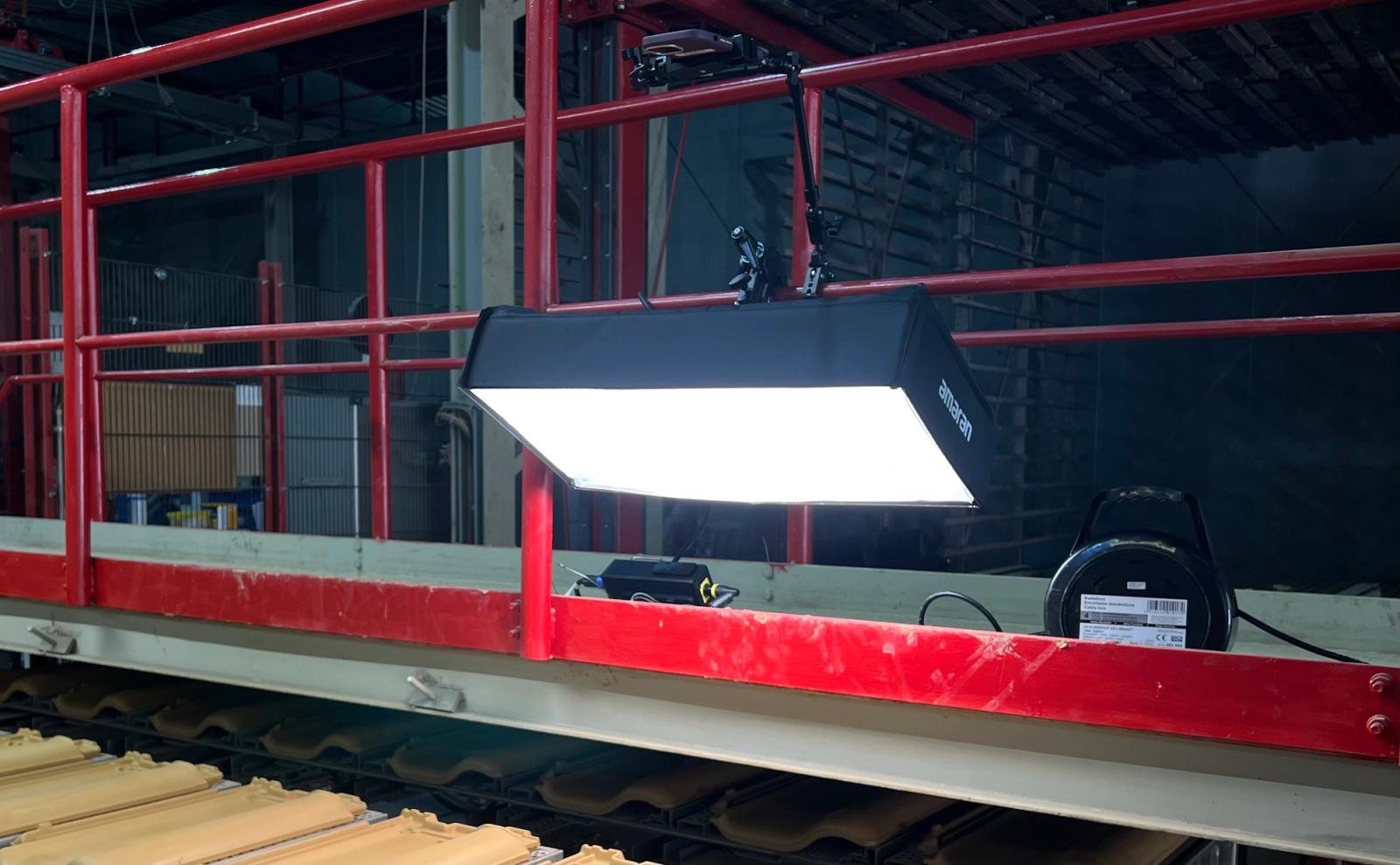
Getting permission to mount hardware or setting up the right way was another common challenge for customers. Many providers only provide their hardware: the proprietary cameras and software. If a customer needed additional gear like mounts and lighting, they either paid the provider a premium or spent more time to source everything. Teams told us they waited weeks for mounting materials to arrive. Others needed sign-offs before anything could be physically installed.
Some went through multiple rounds of delayed approvals to set up hardware just to start collecting images to train the models. The projects stall before they can even start.
What you can do: Ask for a mounting hardware list and setup guide upfront in first chats. This helps you check their level of support for your success. Take the hardware list and get sign off for installations from your management before contracts are signed. This helps your projects get set up faster.
How Enao Vision handles it: Enao Vision’s trial kit includes mounting materials and an iPhone, everything you need to get started on the line. No ordering, no bolting, not waiting. Start scanning products, and reviewing results immediately.
Lighting was not properly set up
Lighting is the most underestimated part of any machine vision inspection project.
Customers who worked with other providers waited weeks for the recommended lighting equipment. Others collected hundreds of useless images because shadows were making good parts look defective. Inaccurate images confused the AI model before the training even started.
But what makes a proper lighting setup? Google, and you will find detailed guides with lighting theory and technical terms for different lighting. The practical question is “What do you need for your production line with your materials and products?”
Some guides will give you generic considerations: Fast lines need short shutter speeds. Short shutter speeds need a lot of light. But too much direct light creates glare, especially on shiny surfaces. Some defects only show up with light coming from the side. How can you figure it out without wasting time and hardware?
What you can do: Ask a provider for lighting guides, recommended lights, and photos of set ups with similar types of products. Also ask the provider if they will help you with the setup.
How Enao Vision handles it: If you want help, ask us. We don’t give generic answers. We've seen every kind of line and surface. We will tell you exactly what lighting setup to use after listening to your needs, and bring the equipment to your trial so you know how a proper setup looks.
Inconsistent defect labels were fed to the AI model
We’ve talked to customers who described whole teams labelling the same defect differently. Bounding boxes for defects were drawn too large, mixing up the good and defective parts. If the labels are wrong, the model is wrong. The inconsistent labelling can confuse an AI model, leading to both false positives and negatives.
With certain types of machine vision inspection, you need to label everything manually. We've heard about models that completely collapsed, not because of the algorithm, but because of the training data.
What you can do: Start with one or two test teams. Choose products that already have a higher defect rate so there is more material. Train all your staff on the line to label the images correctly. Once they’re used to the process and the technology, moving on to trickier products will be easier.
How Enao Vision handles it: Our system suggests labelling tasks automatically for staff to verify. Boxes can be adjusted and labels can be added and customized. Our system actively guides you to the images and defect types that matter most, so you build better training data, faster. We also created guides for labelling, with pictures of real products that we share with customers.
AI models missed what humans missed
Another common issue for defect detection is that the AI model was not “smart” enough to notice something was wrong if the defect was not labelled. This might be because there were too few samples of the defect uploaded. Rare defects might have been skipped because they were hard to catch. Some teams missed defect types entirely during labelling, and only realised when the model failed to detect a whole batch of them.
Some models need the staff to find enough samples of the defects for the model to recognise; by the time they have, the run is already done and it’s a new variant. For rare or subtle defects, models that require large data sets fail.
This means there is no safety net. Many automated quality control systems put the full burden on operators to find, flag, and label every defect manually. That takes time, and it's easy to miss things.
What you can do: Ask a provider how their model works. Compare how many sample providers need before the model starts working. Choose a provider that has a realistic number of images and can clearly explain to you where their models perform well, and what the limitations are.
How Enao Vision handles it: Enao Vision’s machine vision system finds defects on its own. It does this by detecting surface anomalies automatically and flagging them to a human operator to confirm, label, and refine. This approach not only makes the AI model more general and robust, but helps staff focus their energy on decision making and training, not hunting around for pictures to take and upload.
Models did not translate to new products
This problem is one we heard from customers who had used other providers. An AI model that effectively detected defects for one product variant fails in the next. Customers told us about models that performed well in testing, then collapsed when a new product ran on the line. Others generated constant false positives on normal variations the model had never seen. New colours, new surfaces, new profiles, each one can break a model trained on older data.
This performance issue is linked to how the machine vision’s model works. This might mean that teams always need to start over with every product variant. Each time the team needs to manually collect new data and retrain from scratch. You can learn more in our article explaining how the latest AI models for automated defect detection work.
What you can do: Find out exactly how the model works before you commit. Ask them whether the model needs to be retrained for each product variant, or if there is generalised knowledge. If some providers say “no training necessary” ask them how the model can be taught to improve if they make mistakes.
How Enao Vision handles it: Enao Vision’s machine vision system is designed to generalise. This means it automatically identifies where your defect detection model is weak and suggests the right images to fix it. It works as a partner and tells you how to improve it so coverage improves continuously without repeated manual effort.
The Bottom Line
Most automated quality inspection solutions fail for the same reasons: connectivity issues, installation delays, bad lighting, inconsistent labels, and rigid machine vision systems that cannot adapt.
Most of these are solvable problems. At the same time, they are problems that staff are not warned about. Customers are left to solve them on their own. Enao Vision doesn’t do that. We know that success is as much about the technology as it is about the setup. That’s why we’ve handled the software, the hardware, and the full setup package. Every Enao Vision trial kit comes with an iPhone, and 5G hotspot for connectivity, mounting gear, and lighting setup if requested. This helps our customers focus on the task at hand: scanning for defects and seeing results in hours.
Curious what a smooth deployment looks like? Book an appointment with us, we are happy to show you.
Explore with AI
Discuss this article with your favorite AI assistant
